
Trying to send emails in QuickBooks, but the software crashed suddenly? Well, QuickBooks crashing error while sending emails can be one of most annoying issue a user might come across. This error especially appears when emailing an invoice, report or other important accounting document directly from QuickBooks. In such situation, the QuickBooks may get freezes, stop responding or crashes completely whenever the user tries to send an Email using the Outlook or other webmail services. There might be some other unwanted reasons, your software might crash when sending emails. And to help you tackle through this error, here we are with this segment sharing the quick fixes of this crashing error.
Why QuickBooks Desktop Crashing when Sending Emails?
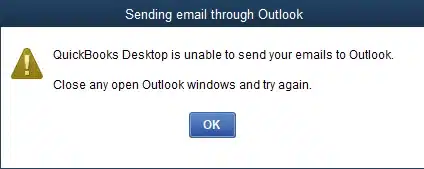
According to the experts, QuickBooks crashing error when sending emails is a random issue and any user can get due to various reasons. This error generally encounters when there is a conflict between QuickBooks and your email configuration. Another reason can be if there is any permission problem or damaged file. Mostly, this error usually appears at the time you are trying to send invoices, reports or any transactions.
Situations when QuickBooks may crash while sending Emails
You may experience the QuickBooks crashing issue while you attempt to send your invoices and transactions over email. However, this error may also come up in the following instances:
- When attaching a company file to your email
- You attempt to use the Send Forms function in QuickBooks.
What factors lead to QuickBooks desktop crashing when sending email?
Here are a few factors that can trigger QuickBooks desktop crashing when sending email. Let’s understand the exact reasons behind it.
- In case QuickBooks is showing a connection issue with the email server, you might come across crashing issue.
- If there are any conflicts with Windows or Email Settings.
- Any damaged Microsoft Windows components.
- If there are third-party applications causing the connection breakage to the email server.
- Also, if the firewall or antivirus running the background is disturbing the connection.
You may also see: How to Fix QuickBooks Error Code 6189, 816?
How to Fix QuickBooks Crashing Error When Sending Emails?
You can try fixing the QuickBooks crashing error when sending emails using the steps and procedures shared below:
Fix 1: Update QuickBooks desktop
- Launch QuickBooks and proceed to the Help tab.
- Go for the Update QuickBooks desktop option and click on Update now.

- Then check-mark on the Reset update option and hit on Get updates to start the update process.
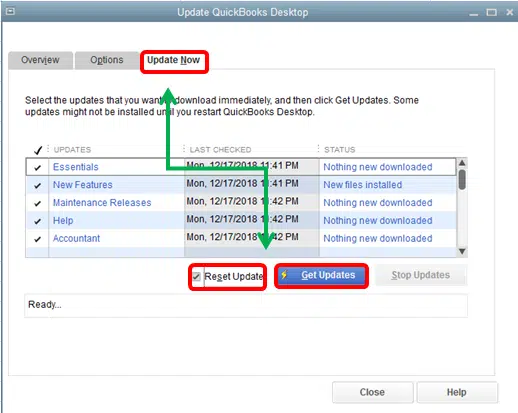
- Once the process finishes, restart QuickBooks.
Fix 2: Adjust webmail preferences settings
- Open QuickBooks and head to the Edit menu.
- After that choose Preferences.
- In the Preferences menu, hit a click on Send forms.

- Once done, choose Email account and click on Edit tab.
- Ascertain that the SSL box being checked.
- Also ensuring that the Server name is correct.
- If the outgoing mail is set as ‘’SMTP. mail.gmail.com’’, change the name to intuit.SMTP.mail.gmail.com.
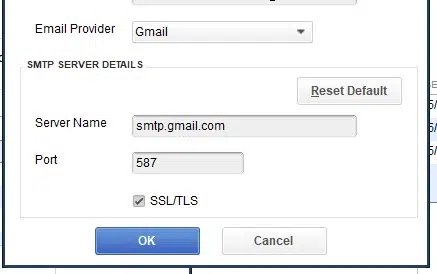
- Hit a click on OK tab.
- Reboot the system QuickBooks and also send a test email to yourself.
Also see: Methods to fix QuickBooks Internet explorer is Turned off error
Fix 3: Use Secure Webmail
You need to use secure webmail within QuickBooks using the steps below to ensure that the error gets resolved.
- Open QuickBooks and move to Edit menu.
- Go to the Preferences tab and then proceed to Send forms.
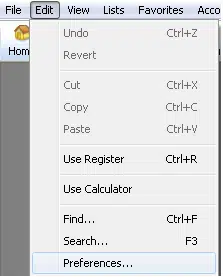
- Next step is to choose Webmail.
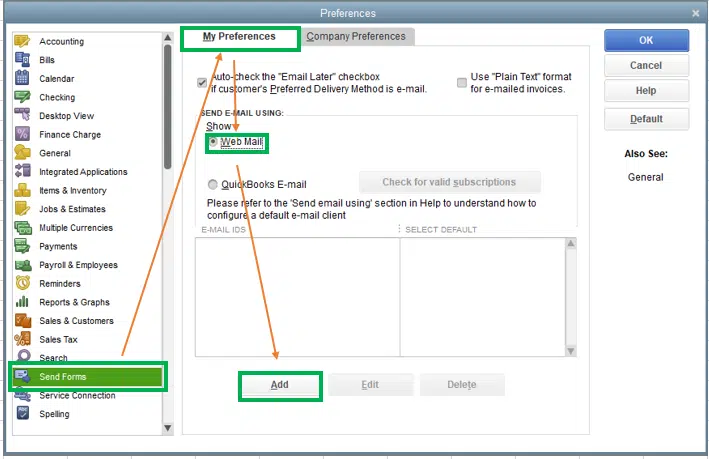
- Once done, hit a click on Add tab and further choose Email service provider from the list.
- Next step is to enter the Email address carefully.
- Ascertain to select Use Enhanced security and maintain Secure email configuration.
- Now hit on OK tab.
- The last step is to reopen QuickBooks and further log in with the correct email credentials.
Fix 4: Configure Firewall settings
You need to configure the Firewall to make sure that it is not causing the crashing of QuickBooks desktop. The procedure for the same is given as follows:
- First of all, Add QuickBooks in the Firewall Exceptions.
- Then set up QuickBooks and Add QuickBooks port exceptions in the Firewall.
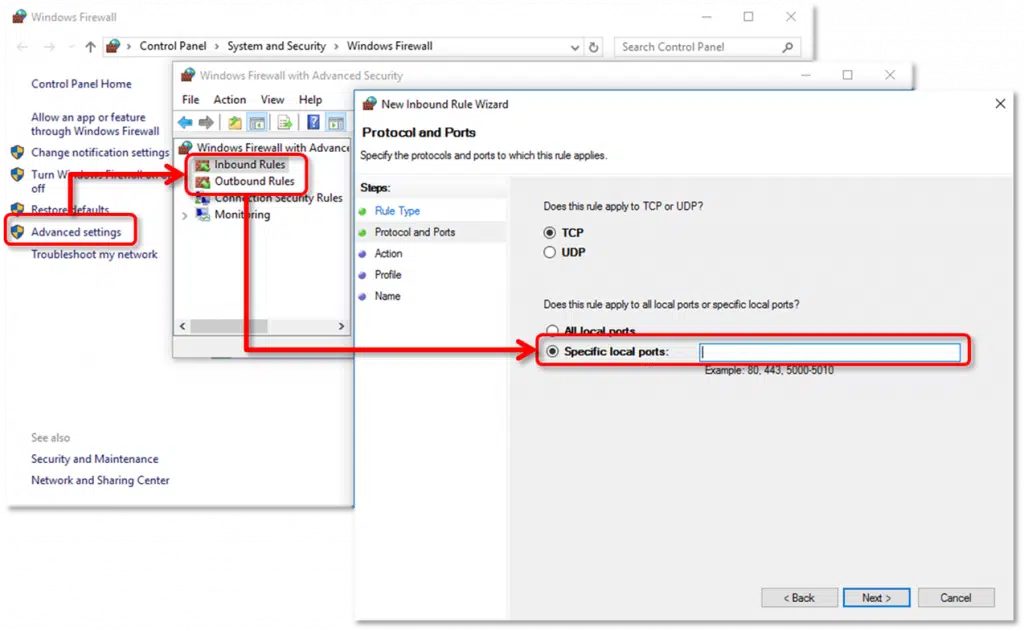
- If the above steps didn't fixed the issue, try to Temporarily disable the Firewall.
Read Also: How to Fix QuickBooks Payroll Error PS077, or Error PS032?
Fix 5: Repair QuickBooks MAPI32.dll file
- Close all open programs that are running on the background.
- Head to the Windows Start menu and further enter File explorer to open it.
- Now go to C:\Windows\System32 folder.
- Next step is to find and rename the current MAPI32.dll file to .old.
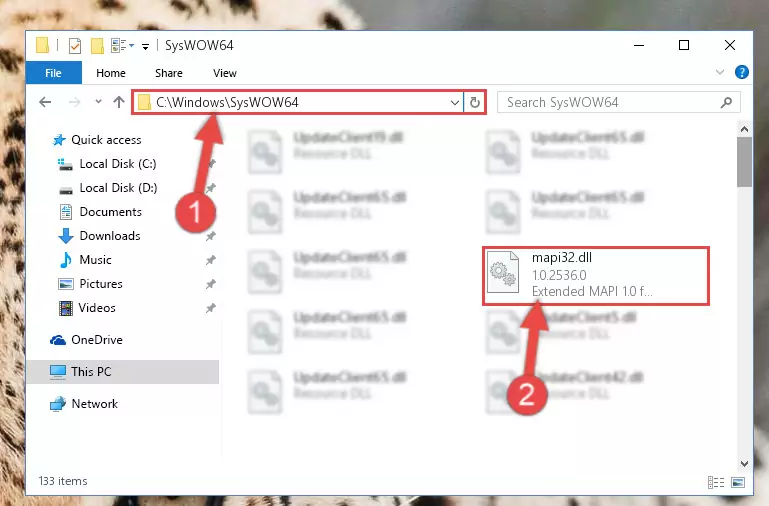
- Also rename the file and reboot the system.
- Your Windows will automatically detect the missing file and further try repairing it and creating a new MAPI32.dll file.
- Once the system restarts, open QuickBooks and also try to send an email to test.
In case the issue continues, you will have to reinstall the MAPI32.dll from the original source or restore it from the installation disk.
Fix 6: Work on QuickBooks Repair
If none of the above steps helped in fixing the QuickBooks crashing error when sending emails, you can try fixing the error using the steps to repair QuickBooks.
- Start by login to Windows as System admin.
- Then backup the QuickBooks data files.
- Once done, enter Control panel and find Program and features there.
- Move to QuickBooks in the list of programs.
- Hit a click on Uninstall/change and then go for Continue tab.
- The next step is to choose Repair tab and also click on Next to begin the repair process.
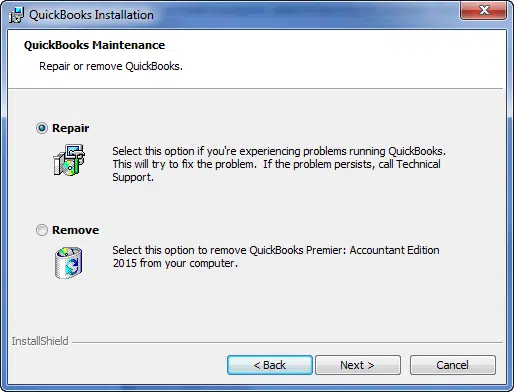
- The last step here is to reboot the system.
Final Words
We hope that, by using the methods shared above helped you in fixing QuickBooks crashing error when sending emails. But if not, then in that scenario, you need assistance from someone who understand the core of the QuickBooks software. And thus, you can simply dial our customer support assistance i.e., 1-800-761-1787, and get assistance from our certified ProAdvisors immediately. Our QuickBooks error support team will ensure that your issue gets resolved easily and immediately.
More interesting articles:
How to Troubleshoot QuickBooks Payroll Service Server Error?
Versions of QuickBooks Desktop supported with Windows 10
Fix QuickBooks Web Connector Error QBWC1085 or Exception TypeError: Unknown name